How to Deploy GLM-5.2 for Low-Latency Inference
GLM-5.2 architecture, benchmarks, hardware, and low-latency deployment.

Aryan Kargwal
PhD Candidate at PolyMTL
Published
Topic
Model Deployment

TL;DR
|
A strange thing has happened at the frontier of AI.
Some of the strongest coding and agent models are becoming harder to treat as permanent infrastructure. Access can depend on geography, vendor policy, API availability, and decisions made far outside the engineering team deploying the product.
GLM-5.2 arrives at an interesting moment. The open-weight model has reached a level of coding and agent performance that puts it close to the leading proprietary systems, while giving teams the option to deploy the model on infrastructure they control.
For engineering teams, access is only half of the problem. A model built for long-context coding agents creates a demanding inference workload. Large prompts increase prefill cost. Long-running agent sessions put pressure on memory and KV cache capacity. Concurrent users turn scheduling, batching, and GPU utilization into production constraints.
Deploying GLM-5.2 is therefore less about getting the model to run and more about building a serving path that can keep latency predictable under real workloads.
This guide covers the architecture, hardware requirements, NVIDIA GPU configurations, runtime decisions, and production metrics involved in deploying GLM-5.2 for low-latency inference.
What is GLM-5.2?
GLM-5.2 is the latest flagship model from Z.ai, the international brand of Beijing-based Zhipu AI. The company was founded in 2019 as a spinout from Tsinghua University and has built the GLM family around general reasoning, coding, tool use, and long-running agent tasks. Zhipu has become one of China’s leading foundation-model companies and took the company public in Hong Kong in January 2026.
GLM-5.2 competes in the same practical category as the leading models from Anthropic, OpenAI, and Google, particularly for coding and agentic workloads.
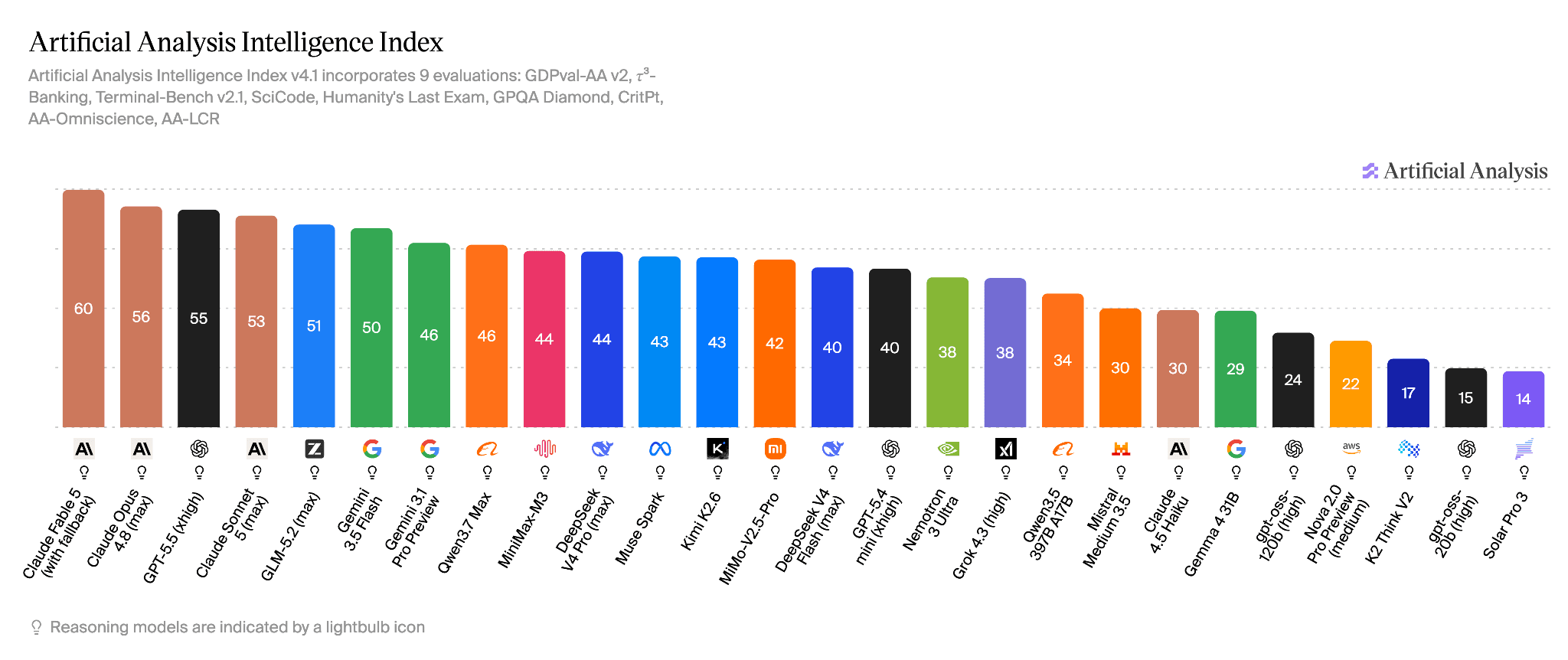
GLM 5.2, The most capable open-source LLM, Artificial Analysis July 2026
Recent independent rankings place it among the strongest models available for general intelligence and front-end coding, while its open-weight distribution gives teams a deployment option that closed API models cannot provide.
The relevant comparison is therefore with frontier-class coding and agent models, including Anthropic’s latest Claude Mythos line and OpenAI’s GPT 5 family.
GLM-5.2 architecture and its inference implications
GLM-5.2 is large even by frontier-model standards. The model contains 753 billion parameters and supports a 1-million-token context window, which makes deployment primarily a memory, communication, and scheduling problem.
Architecture property | GLM-5.2 |
Total parameters | 753B |
Architecture | Mixture of experts |
Context window | 1M tokens |
Attention optimization | IndexShare sparse attention |
Decoding optimization | Multi-token prediction for speculative decoding |
Available model precision | BF16, with additional quantized deployment options |
Check out more about the GLM 5 Architecture through their research paper.
The parameter count immediately sets the scale of the deployment. A 753B model requires roughly 1.5 TB for weights alone at BF16 precision. Lower-precision formats reduce that footprint substantially, but production memory requirements still include KV cache, runtime buffers, communication overhead, and headroom for concurrent requests.
The 1M-token context window creates a different scaling problem. Long prompts increase prefill computation and KV cache demand, particularly when several long-running coding agents share the same deployment.
GLM-5.2 addresses part of the compute cost with IndexShare, which reuses an indexer across groups of sparse-attention layers. Z.ai reports a 2.9× reduction in per-token FLOPs at 1M context compared with its previous indexing approach.
GLM-5.2 also improves its multi-token prediction layer for speculative decoding. Z.ai reports up to a 20 percent increase in accepted speculative sequence length, allowing the serving stack to validate more predicted tokens in parallel and reduce decoding overhead.
The architecture therefore reduces some of the compute cost created by GLM-5.2’s scale, but deployment still depends heavily on weight placement, memory capacity, interconnect bandwidth, KV cache allocation, and the shape of the workload being served.
GLM-5.2 benchmarks
The most useful way to read GLM-5.2’s benchmark results is through the lens of migration.
Teams considering open-weight inference rarely need a model to win every benchmark. They need enough capability on their actual workload to justify moving away from a closed API.
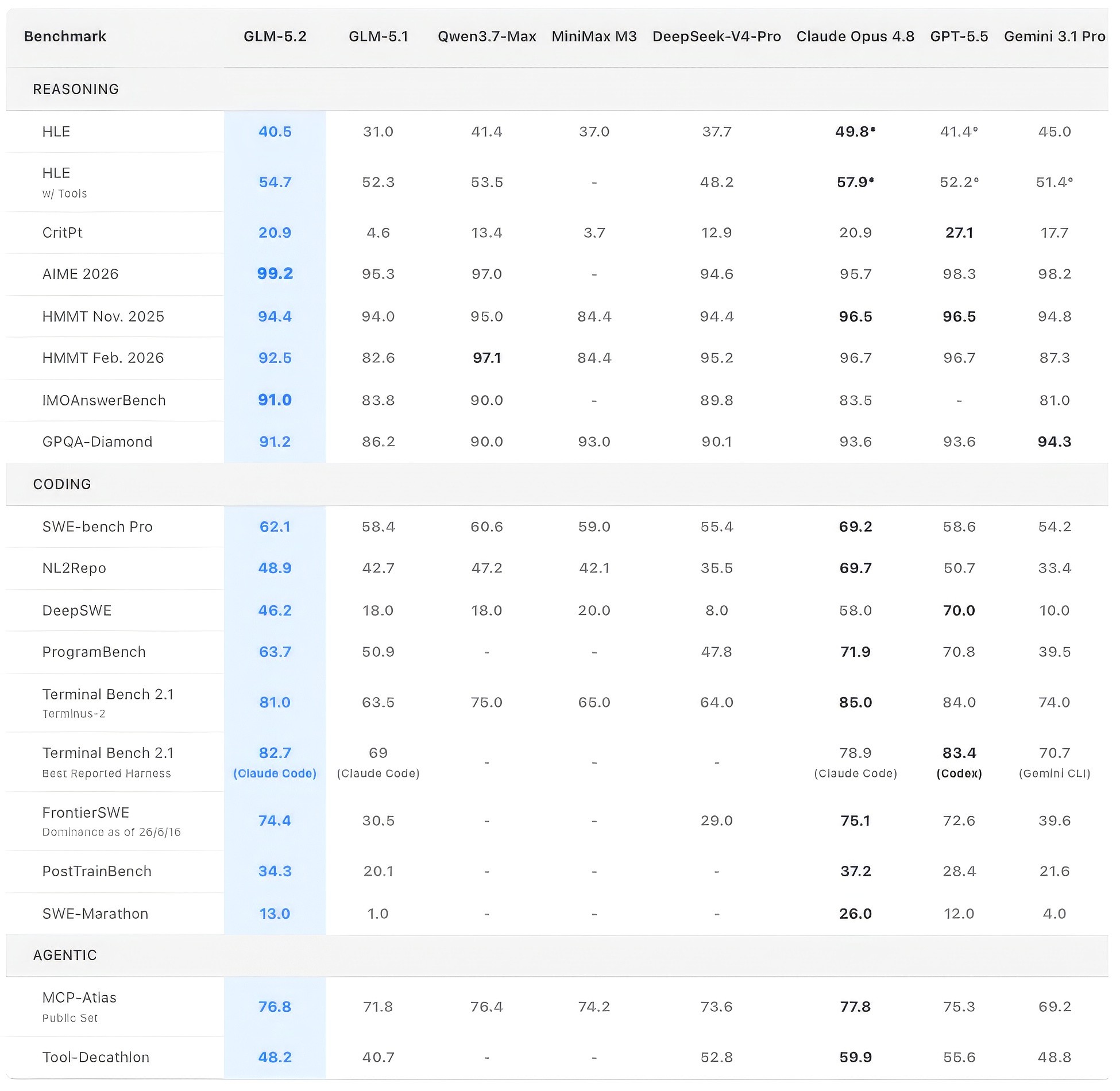
Source: https://z.ai/blog/glm-5.2
On SWE-bench Pro, GLM-5.2 scores 62.1, compared with 69.2 for Claude Opus 4.8 and 58.6 for GPT-5.5 in Z.ai’s reported evaluation. The result places GLM-5.2 within the same practical range as leading proprietary models on repository-level software engineering tasks.
The gap narrows further on agentic workloads. GLM-5.2 reaches 82.7 on Terminal-Bench 2.1 with its best reported harness, compared with 78.9 for Claude Opus 4.8 and 83.4 for GPT-5.5. On MCP-Atlas, which evaluates tool use across MCP servers, GLM-5.2 scores 76.8 against 77.8 for Claude Opus 4.8 and 75.3 for GPT-5.5.
These results do not make GLM-5.2 a universal replacement for every proprietary model. They do make the migration question more practical. For coding agents, terminal automation, and tool-using workflows, teams can now compare deployment control, latency, data handling, and serving cost without starting from a large capability deficit.
GLM-5.2 hardware requirements
GLM-5.2 is too large for hardware planning to stop at parameter count. Teams need to choose a serving precision, reserve memory for KV cache, and size the deployment around expected context length and concurrency.
A quick note on precision: Precision determines how many bits the model uses to store numerical values such as weights. BF16 uses 16-bit floating-point values and offers the highest memory cost of the three formats. FP8 reduces those values to 8 bits, roughly halving the raw weight footprint.
NVFP4 uses 4-bit values for selected parts of the model on supported NVIDIA Blackwell hardware. GLM-5.2’s mixed-precision NVFP4 checkpoint is therefore around 465 GB, while BF16 weights alone require roughly 1.5 TB.
Lower-precision weights leave more GPU memory for KV cache, longer contexts, and concurrent requests. Higher precision requires larger GPU configurations.
For GLM-5.2, FP8 is the most practical production baseline. The official vLLM deployment recipe supports the FP8 checkpoint on a single 8x H200 node. For teams targeting the full 1-million-token context window, the same recipe recommends 8x B200 with FP8 KV cache.
Configuration | Practical use |
8x H200 | Standard single-node FP8 deployment |
8x B200 | FP8 serving with more KV cache headroom and full 1M context support |
B200 or B300 with NVFP4 | Reduced weight footprint on Blackwell hardware |
8x B300 | Large-memory deployments, including BF16 |
Memory capacity is only the starting point
Loading the model is only one part of the memory budget.
GLM-5.2 also needs memory for KV cache, runtime buffers, CUDA graphs, speculative decoding, and concurrent requests. A configuration can have enough memory to load the weights and still struggle once long prompts or several simultaneous sessions begin consuming KV cache.
The vLLM GLM-5.2 recipe treats full 1M-context serving largely as a memory-capacity problem. Its B200 configuration uses FP8 KV cache and adjusts concurrent sequence count according to the available VRAM budget.
Workload shape therefore changes the hardware requirement. A deployment handling shorter prompts can support substantially more concurrent sequences than one serving coding agents carrying hundreds of thousands of tokens of context.
The SGLang GLM-5.2 cookbook makes the same point from the runtime side. Long-context latency depends on prefill configuration, context parallelism, KV cache allocation, and how work is distributed across the node.
Choosing between H200, B200, and B300
GLM-5.2 can run across several NVIDIA configurations, but each one serves a different deployment target.
GPU configuration | Best fit for GLM-5.2 | Main constraint |
8x H200 | Standard FP8 serving | Less memory headroom for extreme context lengths |
8x B200 | Long-context FP8 serving | Higher infrastructure cost |
B200 or B300 with NVFP4 | Smaller model-weight footprint | Depends on Blackwell-specific quantization support |
8x B300 | BF16 or maximum-memory deployments | Excess capacity for lighter workloads |
The official vLLM recipe treats 8x H200 as the standard single-node FP8 configuration. NVIDIA lists each H200 with 141 GB of HBM3e and 4.8 TB/s of memory bandwidth, giving an eight-GPU node enough aggregate memory for the FP8 model while retaining room for runtime state and KV cache.
B200 becomes more useful when context length and concurrency start consuming the remaining memory budget. The vLLM recipe uses 8x B200 with FP8 KV cache for GLM-5.2’s full 1M-token context window.
Blackwell also introduces a lower-precision path through NVFP4. The vLLM deployment guidance describes an NVIDIA NVFP4 checkpoint of roughly 465 GB. The MoE expert linear layers use NVFP4, while other parts of the model remain in FP8 or BF16.
The distinction matters because NVFP4 is not simply the entire 753B model compressed uniformly to four bits. Quantization is applied selectively across the architecture.
B300 becomes relevant when memory capacity itself is the priority. The SGLang deployment cookbook reports that the BF16 model requires roughly 1.5 TB and has been validated on an 8x B300 node with sufficient HBM capacity.
For most production teams, H200 is the practical starting point for FP8 inference. B200 is better suited to long-context workloads and larger concurrency budgets. B300 becomes more relevant when BF16 deployment or maximum memory headroom justifies the additional infrastructure cost.
Hardware alone does not determine latency
A larger GPU configuration does not automatically produce a proportionally faster GLM-5.2 deployment.
The SGLang performance guide reports that increasing chunked-prefill size from 2,048 to 32,768 tokens improved output throughput and substantially reduced TTFT in tested H200 and B200 configurations.
SGLang also reports large TTFT reductions for long-prefill workloads when context parallelism is used appropriately. The same guidance warns that context parallelism consumes additional KV capacity and can introduce decode overhead.
The practical deployment decision therefore extends beyond choosing H200, B200, or B300. GLM-5.2 latency also depends on prefill configuration, KV cache allocation, parallelism strategy, batching policy, and the context distribution of the workload being served.
Production challenges when deploying GLM-5.2
Running GLM-5.2 in production creates problems beyond fitting the model into GPU memory. Long contexts, MoE communication, prefill-heavy requests, and uneven agent workloads can all push latency up even when the underlying hardware looks sufficient.
KV cache pressure: Long prompts and concurrent sessions compete for memory, reducing the number of sequences a deployment can serve at once.
Prefill latency: Large context windows make prompt processing expensive, so TTFT can rise sharply on long-context workloads.
Expert communication: MoE inference depends on moving tokens between experts, making interconnect bandwidth and parallelism strategy important.
Batching tradeoffs: Larger batches improve throughput but can delay interactive requests when long and short sequences are grouped poorly.
Context variability: A workload mixing short chats with 100K-plus-token agent sessions is much harder to schedule predictably.
Runtime tuning: Chunked prefill, speculative decoding, KV cache precision, and parallelism settings can materially change latency on the same hardware.
The production problem is therefore less about whether GLM-5.2 can run and more about whether the serving stack can keep these constraints under control at the same time. PipeShift’s deployment approach starts from that runtime problem.
How PipeShift deploys GLM-5.2
Low latency depends on the full inference path. Network routing, proxy hops, queueing, batching, cold capacity, and GPU placement all contribute to the time a user waits for a response.
PipeShift starts with the workload. The team benchmarks prompt length, output length, concurrency, and latency targets before choosing the serving engine, precision format, parallelism strategy, and GPU configuration. Production deployments have used custom CUDA kernels, runtime selection across engines such as vLLM and SGLang, and workload-specific parallelization.
Large models such as GLM-5.2 make capacity planning especially important. New GPU capacity is not useful if the request queue has already exceeded its TTFT budget while the model is still loading. PipeShift uses warm capacity to keep model instances resident and available before traffic spikes arrive.
PipeShift also manages how different workloads share infrastructure. Short interactive requests, long-context sessions, and prefill-heavy jobs create different scheduling and memory demands.
Workload-aware placement, batching, and bin packing help prevent one request class from degrading latency for the others.
For GLM-5.2, the deployment work therefore spans the entire serving path: network, proxy layer, runtime configuration, memory allocation, workload placement, and GPU execution. Each layer is tuned against the latency target of the actual application.
Frequently asked questions about deploying GLM-5.2
Can GLM-5.2 run on a single GPU?
No practical production version of the full GLM-5.2 model is designed for a single data-center GPU. The model contains 753 billion parameters, so production deployment requires the weights to be distributed across multiple GPUs. The official vLLM recipe uses eight H200 GPUs as a single-node FP8 configuration.
How much VRAM does GLM-5.2 need?
The requirement depends on precision and workload. BF16 weights alone require roughly 1.5 TB, while FP8 substantially reduces the model footprint. NVIDIA’s mixed-precision NVFP4 checkpoint is roughly 465 GB. Production deployments also need additional memory for KV cache, runtime buffers, and concurrent sequences.
Can GLM-5.2 run locally?
Yes, GLM-5.2 is available for self-hosted deployment and supports serving frameworks including vLLM and SGLang. However, running the full model locally still requires substantial aggregate memory. Heavily quantized community variants can reduce the requirement, but local experimentation and production low-latency serving are very different deployment targets.
What is the best GPU configuration for GLM-5.2?
An 8x H200 node is a practical starting point for FP8 inference. An 8x B200 configuration provides more memory headroom and is the documented vLLM path for serving the full 1M-token context with FP8 KV cache. B300 configurations become relevant when BF16 deployment or maximum memory capacity is required.
Does GLM-5.2 really support a 1-million-token context window?
Yes. Z.ai publishes GLM-5.2 with a 1M-token context window. Serving the full context in production still requires sufficient KV cache capacity and suitable runtime configuration. Context length, concurrency, and KV cache precision determine how much of that window can be used efficiently under real traffic.
Should I use vLLM or SGLang for GLM-5.2?
Both runtimes officially support GLM-5.2. The better choice depends on the workload, GPU architecture, latency target, context distribution, and features being used. Teams should benchmark the actual request shape rather than choose a runtime from headline throughput results alone.